Take the photos once. Find them when it matters.
Give your team a simple way to document deliveries, packing, returns, and quality checks. CodaScan organizes the photos in your existing tools so nobody has to sort camera rolls or chase the person who took them.
Keep evidence in the system your team already opens
Keep the storage and order tools your team knows. CodaScan takes care of getting the photos there, linked to the job they document.

Attach photos to Shopify orders
Answer missing-item and damage questions from the order, without asking the warehouse to search its phones.
- Keep capturing when warehouse Wi-Fi drops
- Make product scans and packing photos part of the routine
- Give support photos they can open from the order

Attach photos to WooCommerce orders
Give support a packing record on the WooCommerce order, with photos kept in storage your store controls.
- Photograph orders even without a connection
- Set the product scans and photos your team must capture
- Keep photos in WordPress or your configured S3 storage

Organize evidence in SharePoint
Stop transferring phone photos to a computer and uploading them one by one. Send them to the SharePoint folder or record your team already uses.
- File photos by reference without manual renaming
- Keep photos with the existing list entry
- Collect useful details while the item is still in front of you

Organize files in Dropbox
Give colleagues organized photos in the Dropbox folders they already open, without end-of-shift sorting.
- Find photos by job reference and date
- Keep captured details alongside the photos
- Choose image quality to fit labels or condition checks

Organize files in Google Drive
Keep work photos in your team’s familiar Drive folders instead of scattered across personal camera rolls.
- Choose the folder your team already shares
- Read the captured context in the file description
- Let CodaScan handle names and folder organization
Get the next phone ready without starting from scratch
Save the setup that works for your team and reuse it on eligible licensed devices. Staff can select the right job instead of recreating folders and capture settings.
Saved provider configurations
Name and save store, record, folder, matching, camera, and deletion settings as reusable configurations.
Account-synced setup
Make saved configurations available to licensed devices and remove configurations centrally when they are no longer used.
Choose the right workflow
Switch the active configuration before capture or select a different eligible configuration for an unsent record.
Keep the whole task moving without signal
A delivery or inspection cannot always wait for a better signal. Record it while it happens and let the upload catch up later.
No upload chore at the end of the shift
Capture identifiers, photos, and metadata offline. Uploads resume when connectivity returns, with visible sending and synced states.
Less typing when the connection is down
Cache SharePoint match values or recent Shopify and WooCommerce orders so operators can search and select records without a live connection.
Pick up unfinished work without starting over
Leave an incomplete capture as a draft, resume it later, and search local records by identifier.
Give the next person more than an unexplained photo
Make the label, condition, or inspection detail clear while the item is still there. Colleagues should not need to call the photographer to understand the record.
Scan values into metadata
Use the camera to scan a QR code or barcode directly into a metadata field, not only as the main record identifier.
Fields that fit the checkpoint
Use text, number, choice, boolean, and date/time values. Auto-fill capture timestamps and choose whether a value clears or stays for the next photo.
Correct and extend the record
Edit an identifier after capture and add configuration-specific metadata fields when extra operational context is needed.
Product-level packing checks
For Shopify and WooCommerce, optionally require a barcode scan, a dedicated photo for each line item, an order-level photo, or a combination.
Multiple identifiers, one photo set
Scan or enter several barcodes or order codes for the same capture session. Take photos once and CodaScan delivers the evidence to every linked record.
Check your photos before the opportunity is gone
Review the pictures while the parcel or item is still with you. Add a missing angle or remove an unusable photo before moving on.
Order history and gallery
Review photo previews, open a full gallery, return to the camera for more evidence, and remove individual photos.
Explicit deletion behavior
Choose whether deleting a local photo also removes the corresponding remote file or attachment from the selected provider.
One capture system, multiple checkpoints
Apply the same identifier-led evidence workflow where products enter, move through, and leave the operation.
Returns inspection
Record returned-item condition, packaging, serial or SKU, and the evidence needed for grading or a claim.
Inbound damage and receiving
Tie photos of damage, labels, seals, and received condition to the delivery, product, pallet, or batch code.
Packing, loading, and dispatch
Document contents, quantities, pallet condition, seals, and loading before an order leaves the site.
Quality checkpoints
Capture repeatable visual proof and metadata at production, inspection, or handling steps—even in offline areas.
Keep every angle ready at your station.
Scan and take photos with one phone for everyday work. When you need fixed viewpoints, optional tripod mode lets you add remote phone cameras and control them from your main phone.
Explore tripod mode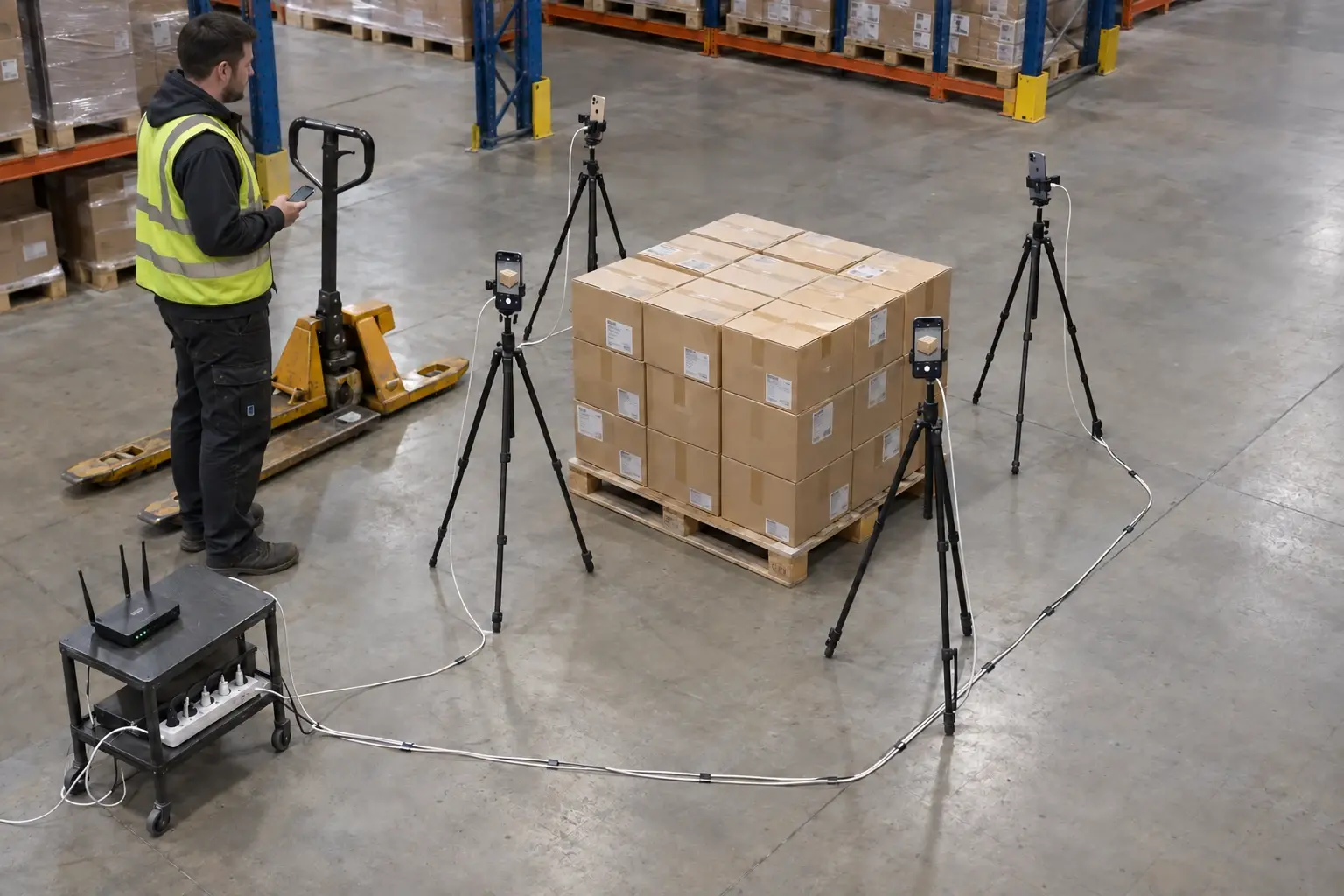
Several angles, one record
Pair cameras by QR code, check live previews, and collect their photos into the active record over local Wi-Fi. Upload to your provider when internet is available.
Photos move from the device to your chosen provider
Provider credentials remain in protected device storage. Photos upload from the device to the selected provider. CodaScan servers handle licensing and optional preset synchronization, not your operational evidence.
- Provider credentials stay in protected device storage
- Operational photos upload to the selected provider — not to CodaScan storage
A focused evidence workflow—not another ERP or WMS
CodaScan does not replace your commerce platform, document storage, warehouse system, or quality system. It removes the manual gap between taking an operational photo and finding that evidence later in the system of record.
Need another connector or capability?
Tell us which system and workflow you already use. When a connector or missing feature fits CodaScan and would help other operations like yours, we can often build it during your pilot at no additional cost.
Discuss your workflowFits the product
If a connector or capability belongs in CodaScan and strengthens the product for other teams too, development may be included in a pilot at no extra cost.
A substantial shared feature
Larger reusable improvements can be delivered through co-development or an agreed license commitment.
Specific to your organization
Exclusive integrations and highly tailored requirements are scoped separately, with a clear proposal before work begins.
See whether your colleagues can find the photos without you
Use the two-week trial on one real delivery, order, or inspection. Capture the photos, check them in your usual tools, and compare the work with your current process.